Documentation / Reference
The model format
The contents of .glyphox/ and what each file holds.
Applies to Glyphox 1.0.10
Each workspace holds one solution. Within it there is one directory for each module under modules/, and within that one file for each asset: a table, a structure, a page, a component, an action, a workflow or an agent.
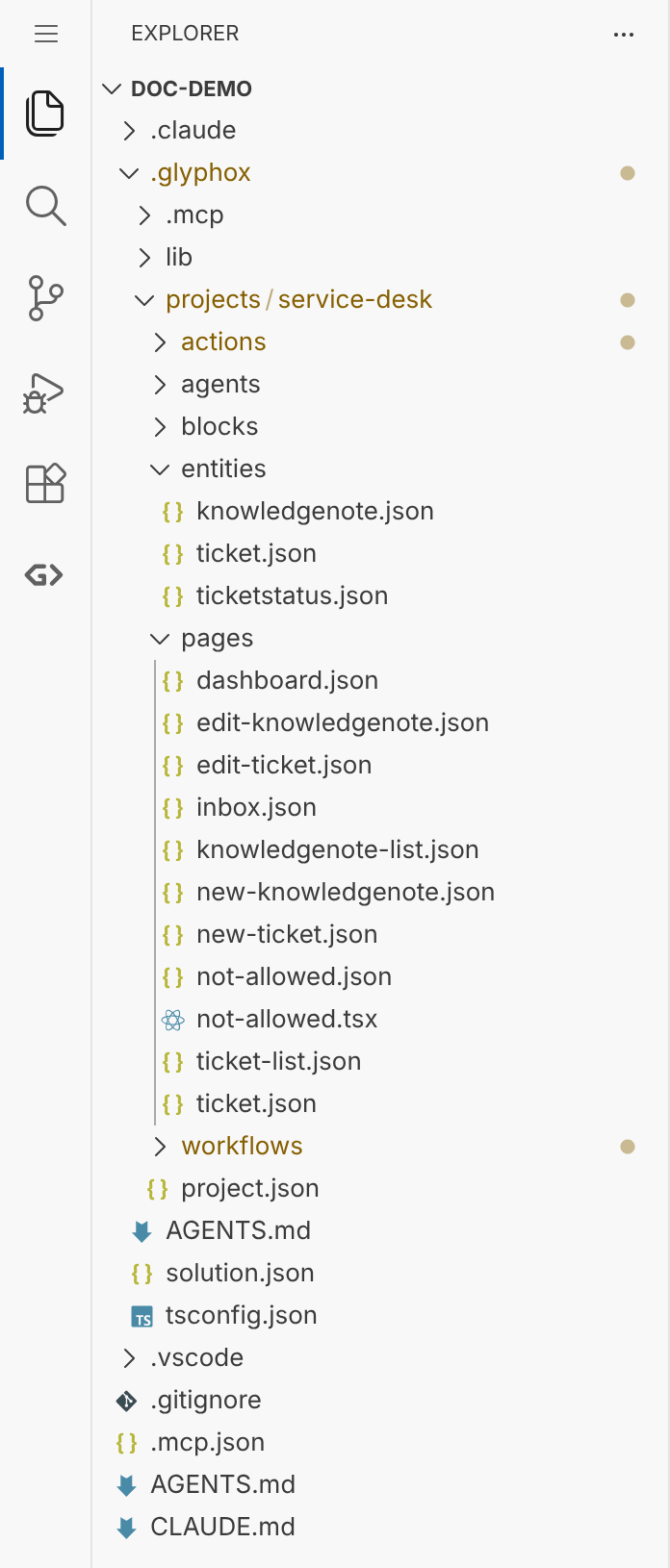
Files are JSON, except components and pages written as code, which are a .tsx file alongside their .json file. Plan documents and your skills are stored at the top level, alongside solution.json.
.glyphox/
├─ solution.json
├─ lifecycle/
├─ skills/
└─ modules/
   └─ service-desk/
      ├─ project.json
      ├─ tables/ticket.json
      ├─ structures/
      ├─ pages/ticket-list.json
      ├─ pages/dashboard.json
      ├─ components/
      ├─ actions/saveticket.json
      ├─ workflows/ticket-escalation.json
      └─ agents/triage-agent.json
The folders carry the names the screens use: a module is stored under modules/, a table under tables/, a structure under structures/ and a component under components/. The module's own file is project.json.
A workspace saved by version 1.0.7 or earlier uses the folder names projects/, entities/ and blocks/. The extension moves these folders to the current names when the workspace is opened, and Git records the moves as renames. A solution that is open read-only is not moved.
Because each asset is a separate file, two people editing different pages do not conflict, and a pull request identifies what changed rather than presenting one large document.
If a step fails, see Troubleshoot the first run or contact support.